Damus

Recent Notes

MakerWire profile picture
CircuitPython 11.0.0-alpha.2 Released!

From the GitHub release page:
This is CircuitPython 11.0.0-alpha.2, an alpha release for 11.0.0. Further features, changes, and bug fixes will be added before the final release of 11.0.0.
CircuitPython libraries from the 10.x bundles are still compatible with CircuitPython 11.0.0 builds.
Highlights of changes since 11.0.0-alpha.1
storage.map_file allows directly reading a file from mapped flash.
usb_host_audio.USBIn to support USB microphones.
RGBMatrix supports ABC row addressing.
USB Host Bulk IN support.
Many speedups, especially in displayio.
Many firmware size reductions.
Espressif ESP32-S31 support.
Zephyr additions: analogio, bitbangio, neopixel_write, pwmio, rtc, and watchdog. Dynamic allocation of board buses.
Incompatibility warnings when upgrading to 11.0.0 from 10.x.x
The broadcom, litex, and renode ports have been removed.
The SDIO pin names on the Adafruit Feather Adalogger RP2040 and RP2350 boards were changed to be more consistent with the naming elsewhere.
On Espressif, the processor UID values are now in canonical order. This changes the reported processor ID, boot_out.txt value, and the USB serial number.
The en_x_pirate translation has been discontinued.
Download from circuitpython.org
Firmware downloads are available from the downloads page on circuitpython.org. The site makes it easy to select the correct file and language for your board.
Installation
To install, follow the instructions in the Welcome to CircuitPython! guide. To install the latest libraries, see this page in that guide.
Try code.circuitpython.org or the latest version of the Mu editor for creating and editing your CircuitPython programs and for easy access to the CircuitPython serial connection (the REPL).
Documentation
Documentation is available on readthedocs.io.
Port status
CircuitPython has a number of “ports” that are the core implementations for different microcontroller families. Stability varies on a per-port basis. As of this release, these ports are considered stable (but see Known Issues below):
atmel-samd: Microchip SAMD21, SAMx5x
cxd56: Sony Spresense
espressif: Espressif ESP32, ESP32-C2, ESP32-C3, ESP32-C5, ESP32-C6, ESP32-C61, ESP32-H2, ESP32-S2, ESP32-S3
nordic: Nordic nRF52840, nRF52833
raspberrypi: Raspberry Pi RP2040, RP2350
stm: ST STM32F4 chip family
These ports are considered alpha and will have bugs and missing functionality:
analog: Analog Devices MAX32690
espressif: ESP32-P4, ESP32-S31
mimxrt10xx: NXP i.MX RT10xx
silabs: Silicon Labs MG24 family
stm: ST non-STM32F4 chip families
zephyr: multiplatform RTOS, running on multiple chip families
Changes since 11.0.0-alpha.1
Fixes and enhancements
Update frozen libraries. #11645. Thanks @dhalbert.
Faster 16-bit image output in displayio. #11633. Thanks @mikeysklar.
Fix dotclockframebuffer RGB display cache flush. #11632. Thanks @mikeysklar.
Fix dotclockframebuffer RGB vsync idle setting. #11631. Thanks @mikeysklar.
bitmaptools: readinto() now reads properly from streams, such as sockets. #11627. Thanks @lynt-smitka.
Reduce code size of number parsing in web workflow. #11626. Thanks @mikeysklar.
Faster computation in vectorio.Polygon, especially on Cortex-M0. #11623. Thanks @lynt-smitka.
Faster computation in synthio. #11621. Thanks @lynt-smitka.
Better and smaller number parsing in settings.toml. #11620. Thanks @mikeysklar.
Fix audiomixer phase inversion. Faster audiomixer computation on Cortex-M33. #11617. Thanks @lynt-smitka.
Accept capitalized UTF-8 as a string encoding name. #11594. Thanks @r3wretrhy.
Update TinyUSB. Includes Fruit Jam USB Host fix. #11582. Thanks @mikeysklar.
Allow ctrl-C to interrupt a program waiting for UART flow control. #11578. Thanks @mikeysklar.
Speed up OnDiskBitmap by using mapped flash. #11572. Thanks @lynt-smitka.
Fix bitbangio deinit. #11567. Thanks @dhalbert.
_bleio.Connection.disconnect() no longer crashes after the peer disconnects. #11560. Thanks @dhalbert.
lvfontio no longer locks the filesystem when reading a font. #11554. Thanks @lynt-smitka.
Fix crash when gifio.OnDiskGif is garbage collected after deinit(). #11551. Thanks @lynt-smitka.
Add usb_host_audio.USBIn to support USB microphones. #11547. Thanks @FoamyGuy.
Save space by consolidating uses of "CircuitPython". #11546. Thanks @mikeysklar.
Save space on small boards by removing some unused float print support. #11543. Thanks @mikeysklar.
Fix a crash after program stops when two displays are in use. #11542. Thanks @mikeysklar.
displayio: fix stray colors when pixel value is one past the end of its palette. #11541. Thanks @mikeysklar.
Save space in mbedtls by using fewer AES tables. #11534. Thanks @lynt-smitka.
Fix storage.unsafe_disable_usb_drive() to restore drive read-only/read-write state. #11530. Thanks @dhalbert.
Fall back to plain Python files (if available) when native or viper files can’t run on the board. #11529. Thanks @mikeysklar.
Save space in the root certificate bundle by storing only a partial hash of the DER subject name. Accept cross-signed roots. #11527. Thanks @lynt-smitka.
Fix storage.map_file after LittleFS addition. #11517. Thanks @tannewt.
Add mii module for wired Ethernet, on Espressif and on Zephyr boards with Ethernet. #11511. Thanks @tannewt.
Validate RGBMatrix constructor arguments. #11490. Thanks @ladyada.
RGBMatrix: add serial ABC row-addressing mode. #11486. Thanks @ladyada.
USB Host Bulk IN support. #11479. Thanks @FoamyGuy.
Add usb_cdc.set_names() to allow user-settable CDC interface descriptor names. #11473. Thanks @BroadwellConsultingInc.
Update ulab. #11469. Thanks @dhalbert.
FourWireBus displays now use ping-pong buffers. #11468. Thanks @lynt-smitka.
OnDiskBitmap is now much faster on rotated displays. #11465. Thanks @lynt-smitka.
Faster displayio: if the stack is large enough, use a larger CIRCUITPY_DISPLAY_AREA_BUFFER_SIZE. #11464. Thanks @lynt-smitka.
Faster displayio: composite common TileGrid rows without per-pixel calls. #11461. Thanks @lynt-smitka.
Add storage.map_file, which reads a file directly from memory-mapped flash. #11363. Thanks @lynt-smitka.
Port and board-specific changes
Analog Devices
Use GC finalizers to clean up objects. Remove never-reset and bulk-reset handlers. #11470. Thanks @tannewt.
Espressif
Save space by removing unneeded C++ support. #11629. Thanks @mikeysklar.
ESP32-S31 support. #11581. Thanks @mikeysklar.
Report BLE pair() failures. #11561. Thanks @dhalbert.
Fix _bleio.Adapter.connect() timeout and ctrl-C handling. #11559. Thanks @dhalbert.
Refuse BLE peer access to NO_ACCESS characteristics. #11558. Thanks @dhalbert.
Fix crash after creating a BLE service and restarting the VM. #11552. Thanks @dhalbert.
Report BLE GATT ATT errors as specific exceptions. #11550. Thanks @dhalbert.
Save space by turning off unused mDNS browsing. #11533. Thanks @lynt-smitka.
Save space by increasing error message compression on ESP32-C5 and ESP32-C6 boards. #11528. Thanks @mikeysklar.
Stop DotClockFrameBuffer jittering. #11522. Thanks @agent-nelson.
Turn on audio on ESP32-C6 boards that have room. #11521. Thanks @mikeysklar.
Update to ESP-IDF v6.1. #11513. Thanks @mikeysklar.
Fix BLE GATT read/write completion and timeouts. #11512. Thanks @dhalbert.
Add high-speed USB host support on ESP32-P4. #11501. Thanks @ladyada.
Report SDIO card frequency in Hz. #11499. Thanks @ladyada.
mipidsi: set output color format and preserve fractional pixel clocks. #11495. Thanks @ladyada.
Use canonical factory MAC value and order for processor UIDs, boot_out.txt, and USB serial numbers. Incompatible change. #11494. Thanks @ladyada-eagleclaw.
Restore ESP32-P4 ROM USB connection on bootloader reset. #11493. Thanks @ladyada.
Correct ESP32-P4 ADC2 channel mapping. #11492. Thanks @ladyada.
i.MX
Fix SPI clock and reinit. #11622. Thanks @lynt-smitka.
Use GC finalizers to clean up objects. Remove never-reset and bulk-reset handlers. #11485. Thanks @tannewt.
Nordic
Make microcontroller.nvm more consistently 8KB on most nRF52840 boards. #11571. Thanks @dhalbert.
Report GATT write errors and provide better exception messages for GATT ATT errors. #11553. Thanks @dhalbert.
Use GC finalizers to clean up objects. Remove never-reset and bulk-reset handlers. #11488. Thanks @tannewt.
RP2xxx
DVI audio. #11607, #11510. Thanks @mikeysklar.
The Feather Adalogger RP2040 and RP2350 SDIO pins were renamed for consistency. Incompatible change. #11584. Thanks @mikeysklar.
Reduce DVI audio RAM consumption significantly. DVI audio is now enabled by default. #11574. Thanks @mikeysklar.
Reset into safe mode instead of freezing after a hard crash involving flash. #11566. Thanks @mikeysklar.
Allow boards to limit RP2350 PSRAM clock frequency. #11565. Thanks @ladyada.
Make CIRCUITPY_FIRMWARE_SIZE be consistent with .ld sizes. #11535. Thanks @lynt-smitka.
Calculate PSRAM timing properly when changing CPU speed. #11516. Thanks @mikeysklar.
Prevent hang at startup due to PSRAM. #11506. Thanks @mikeysklar.
Allow 8 shared IRQ handlers. #11471. Thanks @lynt-smitka.
SDIO sync now waits for the SD card to finish. #11463. Thanks @mikeysklar.
SAMx
Fix SAMD21 bidirectional SPI DMA hang at 12 MHz and up. #11577. Thanks @dhalbert.
Save space by code refactoring. #11537. Thanks @dhalbert.
On SAMD21, save space by using smaller asm soft-float helpers. #11536. Thanks @lynt-smitka.
SiLabs
Fix make flash for SiWx917-DK2605A. #11589. Thanks @mikeysklar.
Use GC finalizers to clean up objects. Remove never-reset and bulk-reset handlers. #11470. Thanks @tannewt.
Spresense
Use GC finalizers to clean up objects. Remove never-reset and bulk-reset handlers. #11470. Thanks @tannewt.
STM
Fix crashes when heap accidentally overlapped the stack. #11610. Thanks @mikeysklar.
Use GC finalizers to clean up objects. Remove never-reset and bulk-reset handlers. #11487. Thanks @tannewt.
Zephyr
Add board.STEMMA_I2C() on appropriate boards. #11640. Thanks @dhalbert.
Restore board buses on non-nordic boards. #11638. Thanks @dhalbert.
Add board buses to nRF54 development boards. #11618. Thanks @dhalbert.
Faster USB CIRCUITPY writes. #11615. Thanks @mikeysklar.
Fix flash scratch page bugs. Fix RP2xxx flash layout. #11613. Thanks @dhalbert.
Add ItsyBitsy nRF52840. #11612. Thanks @dhalbert.
Load the CMake helper ExternalProject_Add for all builds. #11588. Thanks @mikeysklar.
Allow longer REPL pastes. Handle ctrl-C only from the console, not any UART. #11587. Thanks @mikeysklar.
Prevent losing USB console output. #11586, #11549. Thanks @mikeysklar and @dhalbert.
Fix incorrect readback of UART and USB-serial timeout values. #11585. Thanks @mikeysklar.
Report a USB serial number. #11579. Thanks @mikeysklar.
Dynamic board.I2C(), board.SPI(), board.UART() bus device assignment. #11576. Thanks @dhalbert.
CONSOLE=1 flag builds, which put the Zephyr console on the default UART pins. #11576. Thanks @dhalbert.
Report correct chip name and CPU frequency. #11575. Thanks @mikeysklar.
Fix various RP2xxx bugs. #11573. Thanks @mikeysklar.
Implement resetting into bootloader by changing the serial port speed to 1200 baud. #11570. Thanks @mikeysklar.
Implement bitbangio. #11568. Thanks @dhalbert.
Improve BLE error reporting by raising GATT ATT errors as specific exceptions. #11556. Thanks @dhalbert.
Enable native modules adafruit_pixelbuf and _pixelmap on boards with neopixel_write. #11538. Thanks @dhalbert.
Implement pwmio. #11525. Thanks @dhalbert.
Check for ctrl-C on console UART during Zephyr sleep. #11520. Thanks @tannewt.
Implement watchdog. #11518. Thanks @tannewt.
Remove nRF7002DK. #11511. Thanks @tannewt.
Provide nrfx PWM deinit hook. #11508. Thanks @dhalbert.
Fix native_sim asyncio and busio.SPI. Add SPI loopback tests. #11504. Thanks @lynt-smitka.
Implement rtc. #11491. Thanks @tannewt.
Integrate Adaboot. #11484, #11457. Thanks @tannewt.
Implement analogio. #11481. Thanks @tannewt.
Add neopixel_write. #11475. Thanks @dhalbert.
Individual boards
Adafruit Metro RP2350: enable picogame. #11474. Thanks @FoamyGuy.
Espressif ESP32-S31-Korvo-1: enable use of board display. #11630. Thanks @mikeysklar.
UARTLogger II: turn off EPaperDisplay to prevent firmware overflow. #11548. Thanks @mikeysklar.
Documentation changes
Generate an llms.txt file in the documentation root to give coding agents a compact map of every page. #11462. Thanks @lynt-smitka.
Build and infrastructure changes
Fetch micropython-lib for frozen modules during CI. #11624. Thanks @lynt-smitka.
Translation additions and improvements
Discontinue en_x_pirate translation. #11595. Thanks @dhalbert.
New boards
Adafruit Metro ESP32-P4. #11643. Thanks @ladyada and @tannewt.
Cytron Maker Sumo RP2350. #11545. Thanks @alifaiman-af (@CytronTechnologies).
Espressif ESP32-S31-Korvo-1. #11630, #11581. Thanks @mikeysklar.
Freenove ESP32 Display 3.5 inch. #11540. Thanks @agent-nelson.
Generic ESP32-S3 Supermini. #11563. Thanks @grgrant.
Waveshare ESP32-C5 LCD 1.47. #11480. Thanks @dglaude.
Waveshare ESP32-S3-Touch-LCD-1.69. #11532. Thanks @agent-nelson.
Waveshare ESP32-S3-Touch-LCD-2.1. #11523. Thanks @agent-nelson.
Known issues
See https://github.com/adafruit/circuitpython/issues for other issues, including issues still to be addressed for:
10.3.x
11.0.0
11.x.x
long term
Thanks
Thank you to all who used, tested, and contributed toward this release, including the contributors above, and many others on GitHub and Discord. Join us on the Discord chat to collaborate.

https://blog.adafruit.com/2026/10/21/circuitpython-11-0-0-alpha-2-released/


#rss #feeds #linksharing #qwibbit
MakerWire profile picture
Building a Simple Internet Radio

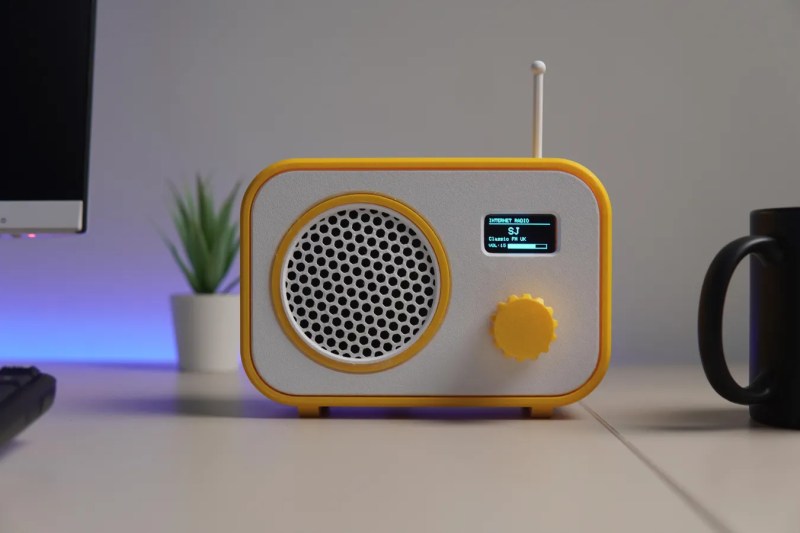
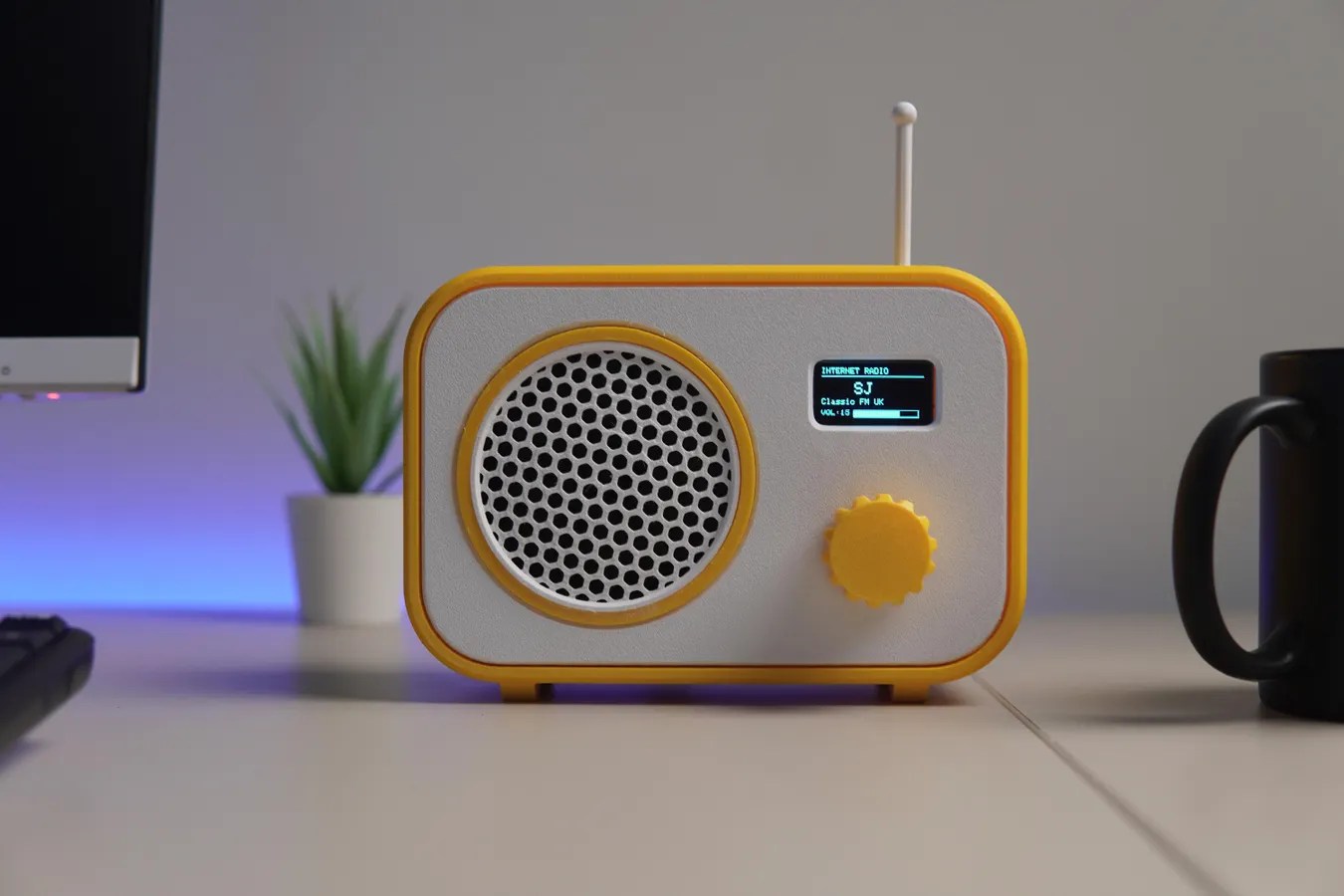
Broadcast radio isn’t as popular as it once was, its popularity suffering in turn due to technologies like MP3 players and music streaming services. If you don’t fancy either of those, you might like to listen to some internet radio stations, using a rig like the one [CodersCafeTech] built.
It’s a simple desktop radio set, but instead of tuning in to AM or FM broadcast bands, it has an antenna for 2.4 GHz instead. That’s because inside this radio is an ESP32-S3 development board, which is equipped with onboard WiFi hardware that lets it connect to the internet. It’s hooked up to a 1.3-inch OLED display over I2C, which acts as a user interface in concert with a rotary encoder. Sound is handled with a MAX98357 I2S audio amplifier, hooked up to a small 3 W speaker. Once programmed appropriately, all the unit needs is a WiFi SSID and password, and the URL for the internet radio station you’d like to listen to.
We’ve featured a few internet radio builds over the years, as well as a rather fun build that saw a Macintosh SE/30 hooked up to Spotify. If you’re tinkering with something along those lines, don’t hesitate to let us know on the tipsline!

https://hackaday.com/2026/10/21/building-a-simple-internet-radio/


#internetradio #simple #once #wifi #oled #spotify #macintosh

#rss #feeds #linksharing #qwibbit
MakerWire profile picture
LIVE! 3D Hangouts with Noe and Pedro

3D Hangouts – USB Desk Hub, Holiday Wreath and Caroline
https://youtube.com/live/_yM1B3QA7ok?feature=share
This week @adafruit Noe is showcasing his guide for his built-in USB hub for the Ikea MITTZON desk. Pedro is working on a new project inspired by the Apple HomeView. Checking out this week’s Timelapse Tuesday model of Caroline.
USB hub for Ikea Mittzon
https://learn.adafruit.com/4-port-usb-hub-for-ikea-mittzon-desk/
CH334F 4-port USB Hub Breakout
https://www.adafruit.com/product/5997
NeoPixel JST Breakout
https://www.adafruit.com/product/5975
Sparkle Motion Mini
https://www.adafruit.com/product/6160
Timelapse Tuesday:
Coraline flexi keychain By Goomol DIY
https://makerworld.com/en/models/3287084-coraline-flexi-keychain
https://youtu.be/QK_2sxMkSuo

https://blog.adafruit.com/2026/10/21/live-3d-hangouts-with-noe-and-pedro-89/

#usbhub #noe #timelapsetuesday #pedro #ikeamittzon #holidaywreath #caroline #breakout #goomoldiy #minitimelapse

#rss #feeds #linksharing #qwibbit
1
Tracking Token Disrespector · 1d
🤖 Tracking strings detected and removed! 🔗 Clean URL(s): https://youtube.com/live/_yM1B3QA7ok ❌ Removed parts: feature=share
MakerWire profile picture
The Age of Altair

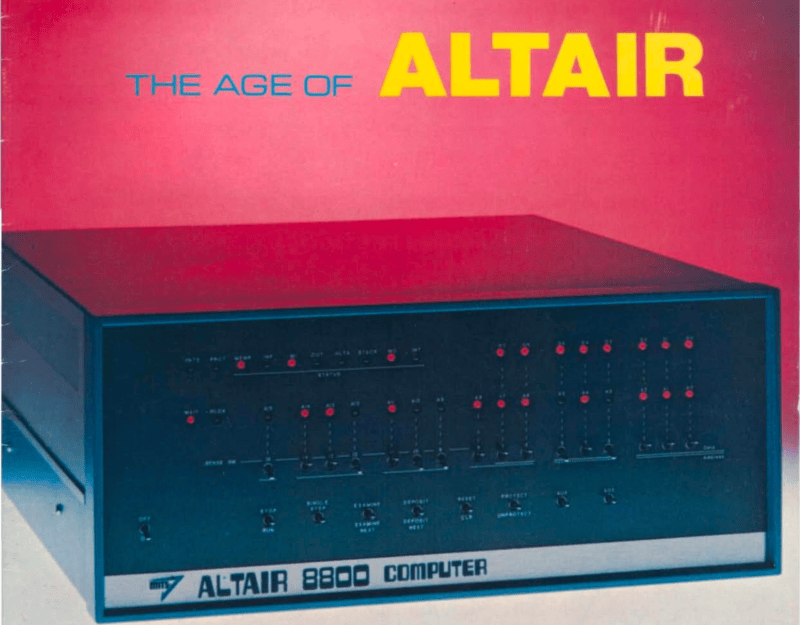
I recently got the Amazon Christmas toy book in the mail, and it is definitely the modern version of the Sears Christmas Wish Book for last century’s youth. Or at least the majority of last century’s youth. For the true hacker, we had a different set of wishes. Recently, I found something I’ve clung to for over 50 years: the 1975 “The Age of Altair” catalog from MITS. Now that was a wish book!
The poor thing has been dragged around for decades and, I’m sad to say, it looks it. It isn’t totally trash, but I decided I should scan it. Then I realized that Bitsavers has already done it for me and with a much nicer copy, too. The images in this post are from their scan instead.
About the Altair
The magazine that started it all (World Radio History).
If your first computer ran Windows, you might not get the significance of the Altair. Back in 1974, the idea of having your own computer was practically ludicrous. Sure, Radio Electronics had published plans for the Mark 8 in July of that year. But it used an anemic 8008 CPU, and it wasn’t easy to get all the parts you’d need to build one. Other limited computers, like the Kenbak-1 or the occasional surplus minicomputer, ended up in personal hands. But you couldn’t just decide you wanted a real computer, plunk down some money, and have one delivered unless you had extremely deep pockets.
To stay on magazine stands longer, old print mags would come out earlier than their cover date suggested. The January 1975 Popular Electronics arrived, actually, in December of 1974 — just in time for the holidays. It showed a computer you could buy as a kit or assembled: the Altair 8800. Many of us were mesmerized by the idea of owning an actual useful computer.
Reality Check
Of course, the problem is, it wasn’t actually a useful computer. All by itself, it was a bunch of switches and LEDs with a CPU. You’d need memory, and even a little was super expensive. But it was still cheaper than anything else. Want a terminal and enough memory to run BASIC? That’s going to be even more.
In those days, magazines had “bingo cards.” Each ad had a number, and if you wanted more information, you circled that number on the card and mailed it to the magazine. A while later, you’d be rewarded with mail from the company in question. I have no idea how many of the “Age of Altair” catalogs were sent, but I know I got one.
The machine on the cover didn’t look much like the machine in the magazine. The story is that the original machine was sent to the magazine for photography and was lost in the return shipping. But either way, it looked like a small minicomputer of the era.
Micro
The CPU board used what would later be called the S-100 bus.
The catalog notes a cycle time of two microseconds, or about 500 kHz. That’s a little misleading. The CPU actually ran at 2 MHz, but each instruction took multiple clock periods, and some instructions required several machine cycles. Even a simple NOP took two microseconds, while more complex instructions could take considerably longer. It wasn’t a speed demon.
One nice thing about the Altair is that it had a card cage, and you could plug in whatever you wanted with what would later be called the S-100 bus. Of course, to save money, you might not get all the card guides and connectors.
If you had deep pockets, you could get fast static memory. This would cost more and provide less memory, but the chips stored bits in flip-flops, and it was fast. Or you could opt for more dynamic memory, which stored data in tiny capacitors on its memory chips. The downside is that the memory had to periodically refresh itself, stealing cycles away from the already slow CPU.
Down with Switches
The Comter 256 showed a whole 32 characters at a time!
Naturally, you didn’t want to flip switches all the time. MITS offered the Comter 256 terminal. It had 256 bytes of its own storage and a whopping 32-character display. It even had holes to stick your phone in, if you wanted to talk to a remote computer.
This was, of course, not very practical. Your best bet was a TeleType. The TeleType Model 33 had a printer and a keyboard. The ASR variant had a paper tape reader and punch, too. Mass storage and a printer that operated at 10 characters per second. No screen, though. Everything you did was on paper. And it was pricey, too.
Software
The catalog offered a 4K and 8K BASIC along with “Extended” BASIC, which needed 12K but got you double precision math, PRINT USING, and disk I/O. There was also a single page of 8080 instructions in binary. I remember fixating on that page, trying to understand how you’d program this machine. There was a lot of missing detail.
Pricing
For as cheap as these were compared to the alternatives, they were still out of reach for many people, especially a kid. The computer itself was just a bit over $600 unless you wanted to build it yourself. Then you could save just under $200.
You couldn’t do anything without memory, though. A board that could hold 1 kB of static RAM (but only came with 256 bytes) was $134 assembled, plus $61 for every 256 bytes after that. If you wanted the board fully loaded, they discounted that to $209. The slower 4 kB dynamic RAM board was a cool $338. If you didn’t have paper tape, you probably wanted the interface to load and save programs from cassette. That was another $174.
Wanted something with a keyboard? The Comter terminal was $885, but for $35 more, you could get one that would also work with your cassette recorder to save and load things. Or opt for the TeleType for $1,500. You might be tempted by the 88-VLCT (the “low cost terminal”) at only $169. But if you saw it, it only had seven numeric keys (for octal) and two other buttons.
That’s not all. Those terminals had to plug into something. That board would run you around $140, depending on which variant you wanted. Even something like a real-time clock was an extra purchase.
The base computer price had four available slots, one of which held the CPU. So if you had a CPU, two memory cards, and a serial I/O card, you were full unless you bought more slots. To make it easier, you could buy a bundle. The cheapest was just shy of $3,000.
Perspective
Why are the addresses backward? Part of the PEMON monitor from the November 1975 Popular Electronics.
I know. It is easy enough to spend $3,000 on a state-of-the-art computer today and, at the time, this was pretty state-of-the-art. But in today’s dollars, that’s about $19,000. A new car was about $5,000, and $3,000 would get you a very nice used car. An average home ran about $42,000, and $3,000 would be a hefty part of a down payment. The median income in 1975? Under $14,000.
Still, these were the first real computers you could at least imagine buying. It wouldn’t be long before the prices of even better machines dropped considerably.
I wasn’t the only one who wanted one of these machines. I conspired with friends to pool money to get one, but we never managed it. I pored over machine code listings in later magazines and the instruction reference in the catalog, trying to puzzle it out. I finally did. In those days, you couldn’t just download the manuals or watch a video about it.
Then again, the value of an original working Altair 8800 today makes it, again, out of reach for most of us. There are always faithful recreations. Or even less-than-faithful ones. I have plenty of these recreations and simulations now, but I still have kept the catalog I pored over so many years ago.

https://hackaday.com/2026/10/21/the-age-of-altair/


#age #amazonchristmas #searschristmas #cpu #wishbook #radio #radioelectronics #radiohistory #worldradio #even

#rss #feeds #linksharing #qwibbit
MakerWire profile picture
Clotty The Custom Period Tracker Can, Of Course, Run DOOM

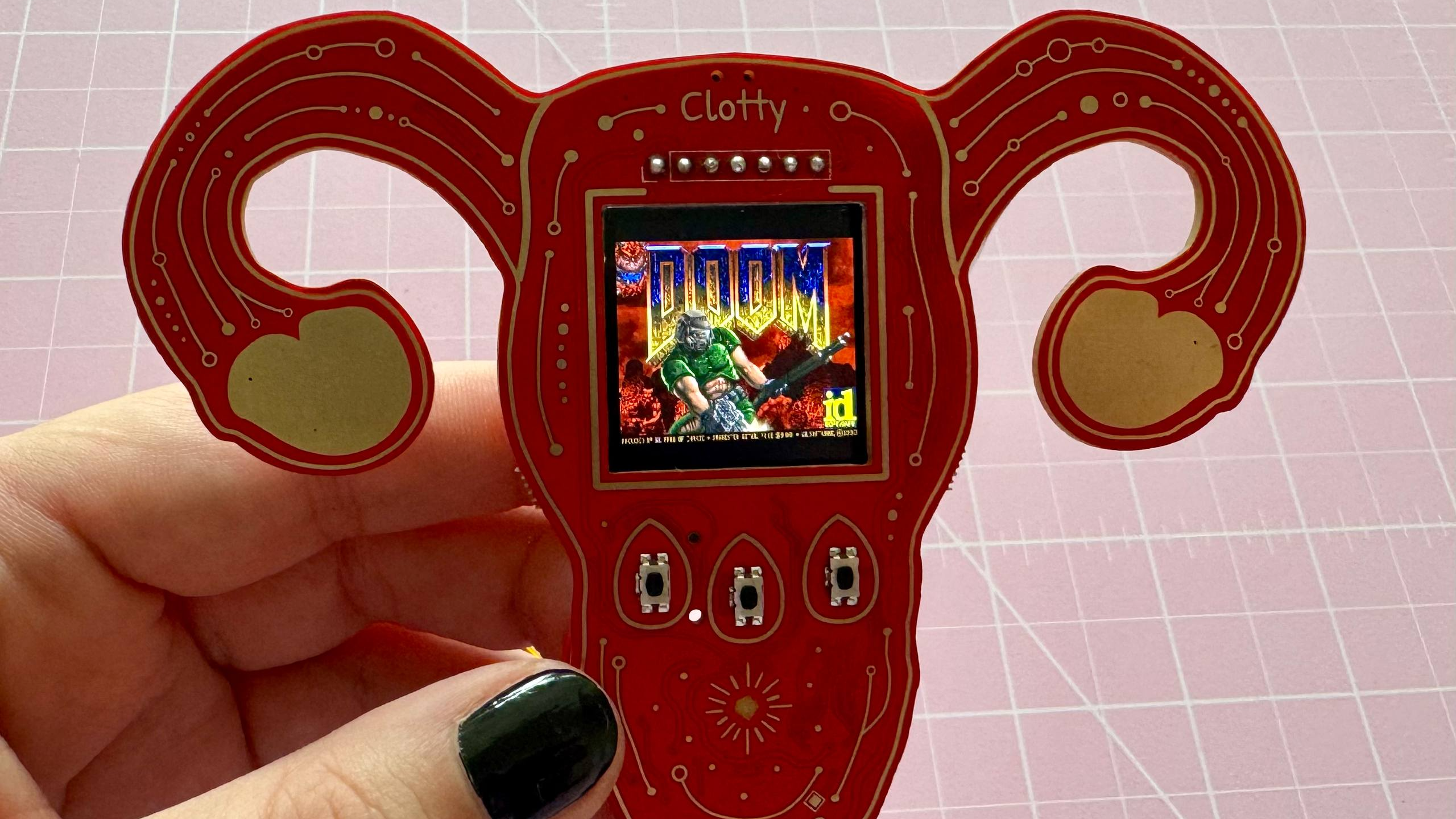
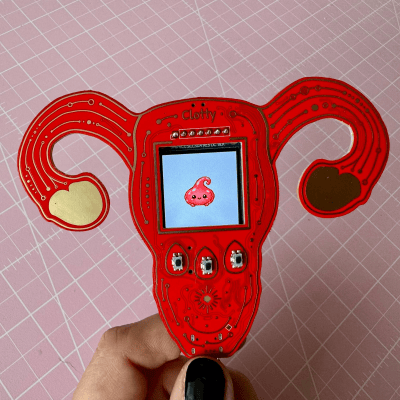
[kati]’s Clotty might run DOOM and game-ify the menstrual tracking process with a playful Tamagotchi-like aspect, but don’t let that distract you. It is, at its heart, a personal menstrual cycle tracking device that is defined as much by what it does do as what it doesn’t.
Clotty brings a Tamagotchi-like playfulness to the table.
What doesn’t it do? Well, it will never quietly upload one’s menstrual tracking data to a remote server. Nor will it harvest, mishandle, disclose, or sell that same data. Shamefully, that alone sets it far apart from the wide range of period tracking services and apps out there. Also setting it apart is its cheerful lack of discretion. As [kati] puts it, she wanted Clotty’s design to scream “HELLO I AM A PERIOD TRACKING DEVICE” and at this she absolutely succeeded.
Clotty uses an RP2040, color LCD display, and a small variety of sensors built into a palm-sized, uterus-shaped PCB complete with touchpad ovaries. Right now it’s still in its early stages, and basically at the point that everything works hardware-wise and the essentials are there for software, but it’s still in active development. Keep an eye on Clotty’s GitHub repository for updates as features get fleshed out.
Of course, as [kati] observes, the core validity of a device can be defined by whether it can run DOOM, which of course Clotty can. You can find [kati]’s fork of RP2040-DOOM here.
[kati] has a knack for designing effective hardware that gamifies functions and incorporates a playfulness to the design that’s a delight to see. Take a moment to check out her Slightly Sentient D20 which is another excellent example of the kind of work she does.

https://hackaday.com/2026/10/21/clotty-the-custom-period-tracker-can-of-course-run-doom/


#rundoom #course #clotty #tracking #device #slightlysentient

#rss #feeds #linksharing #qwibbit
MakerWire profile picture
A Stereo Vision Board For Hardware Hackers

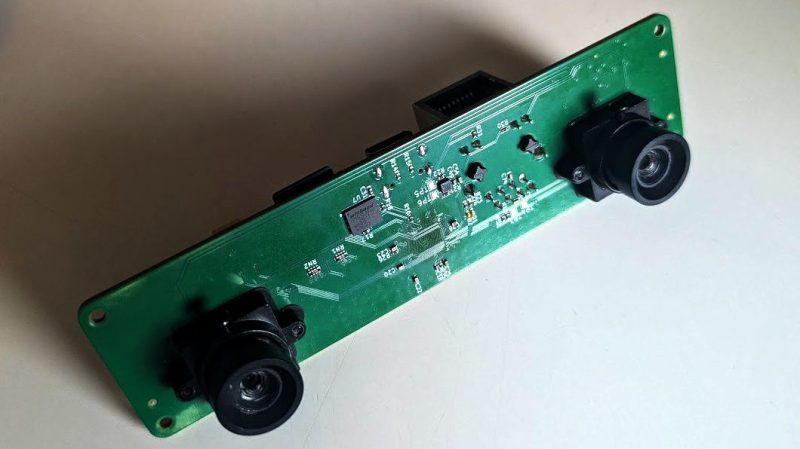
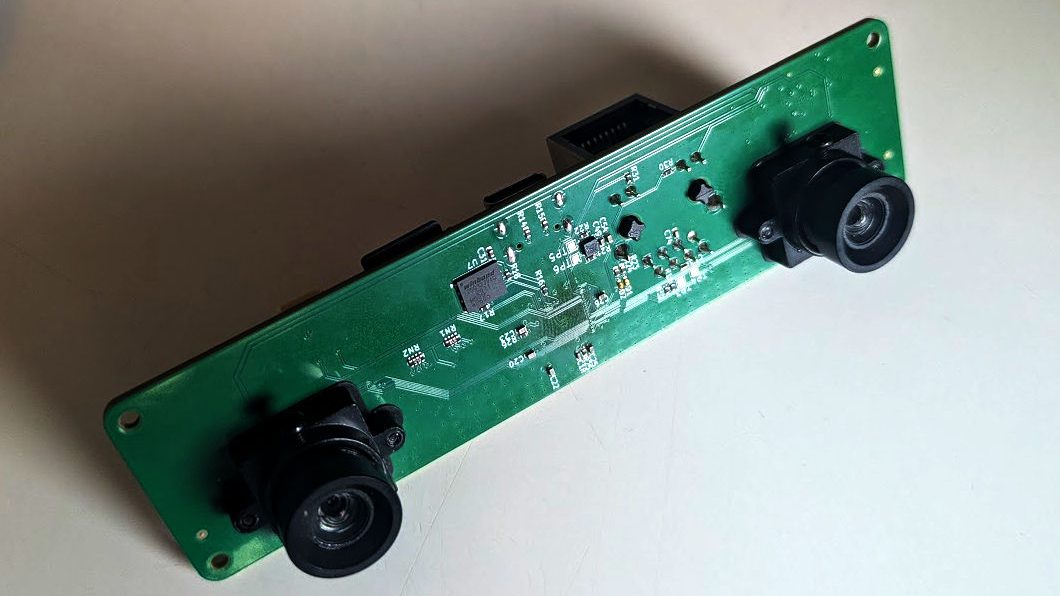
It’s plenty easy to do lots of vision tasks with a single camera, but using two cameras gives you lots of magical abilities, like depth perception! If you’d like to experiment with stereo vision, you might enjoy this board that [machinehum] built specifically for hackers.
The project came about because [machinehum] was particularly excited about the Rockchip RV1103, a 1.1 GHz single-core ARM chip. It comes with 64 MB of DDR2 RAM and a has a MIPI CSI-2 bus on board, which comes in handy for interfacing cameras. Thus, it was the perfect part to whip up a stereo vision board with on-board compute capability and Linux support right out of the box. The processor is paired with two OV9281 global-shutter cameras, as well as a LI2HH12 3-axis accelerometer to provide motion sensing. There’s also 4 MB of flash memory thrown on board, as well as a 10/100 Mbit Ethernet interface for good measure. [machinehum]’s write-up also lays out the software stack and how everything works in concert with Video4Linux2.
If you’re new to experimenting with stereo vision, you might find this to be a useful platform for getting started. Design files are on GitHub for the curious. We’ve seen similar projects built using the Raspberry Pi before, too, which itself is essentially just a fast ARM powered computer with useful camera interfaces built-in. Funny that.

https://hackaday.com/2026/10/21/a-stereo-vision-board-for-hardware-hackers/


#stereovision #visionboard #hackers #arm #mbitethernet

#rss #feeds #linksharing #qwibbit
MakerWire profile picture
5 GHz Drone Video, With An ESP32

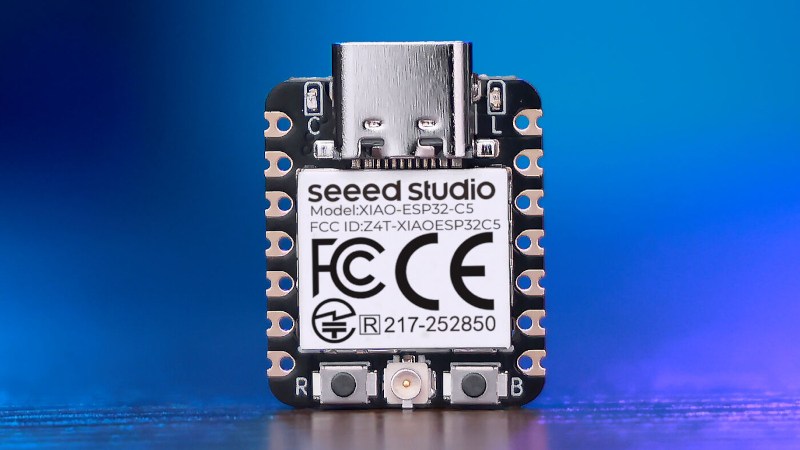
With the ESP32 series of microcontrollers having had hidden software-defined radio (SDR) facility revealed, we’re now moving on from the announcement into projects making use of the finding. [Twotoz] has one using an ESP32-C5, to receive and demodulate analog FM video.
You might think that video is something which has largely gone away in 2026, with TV transmissions having made the switch more than a decade ago, and home entertainment appliances having used HDMI for longer. But it’s still very popular in the world of drones however, where it exists as 5 GHz FM transmission. There’s no digital cliff-edge to lose your picture if you fly into somewhere with bad propagation of radio waves, and perhaps more importantly, it has an extremely low latency. This receiver uses a Seeed Studio Xiao ESP32-C5 board with a simple resistor-ladder DAC to produce the video. It has a simple button channel interface, and a serial link for more in-depth options.
It’s good to see these projects appear, especially as this one’s 5 GHz and shows those chips work too with the hack. We’d be interested to know whether the latency of the SDR affects its usability though. You may be interested to know this isn’t the first time we’ve seen an SDR do video.
Thanks [Ink] for the tip!

https://hackaday.com/2026/10/20/5-ghz-drone-video-with-an-esp32/


#ghz #sdr #studioxiao #seeedstudio #twotoz #ink #dac

#rss #feeds #linksharing #qwibbit
MakerWire profile picture
ICYMI: The Python on Microcontrollers Newsletter: New MicroPython Dev Environments, Pirate Gets the Boot and More!

If you missed this week’s Python on Microcontrollers Newsletter, here is the ICYMI (in case you missed it) version.
To never miss another issue, subscribe now! – You’ll get a terrific newsletter each Monday (which is out before this post). 12,339 subscribers worldwide!
The next newsletter goes out Monday morning and subscribing is the best way to keep up with all things Python for hardware. No ads or spam, no selling lists, leave any time.
From the Editor:
Welcome to the latest Python on Microcontrollers newsletter! Ok, the controversy first. The CircuitPython Pirate language pack was supposed to be turned off, but I found out it wasn’t. When CircuitPython just had a few boards, it was funny. Now with so many boards, it loads down the build process. So after I mentioned it, the developers finally turned it off for the upcoming CircuitPython 11 builds. I’ll take the heat, mates.
With software reverse engineering and automated development exploding on the scene, expect many more applications in the coming days. To wit, there are two new MicroPython development environments out this week. I’m now off to walk the plank. – Anne Barela, Editor
We’re on Discord, Twitter/X, BlueSky and for past newsletters – view them all here. If you’re reading this on the web, please subscribe here. Here’s the news this week:
Microbe: A New Lightweight IDE for MicroPython
Microbe is a new lightweight IDE for MicroPython by Mikayel Grigoryan. It talks directly to a board, giving a Python language server that knows the machine and network, and flashes firmware. It is built on Tauri instead of Electron, using an operating system’s webview, and it has a Rust core – GitHub.
Thingstudio Programs MicroPython Boards Using Nodes and Wires
Thingstudio is a visual, low-code way to program microcontrollers. You build a flow of nodes and wires in a node-based editor in your browser, in the style of Node-RED. Thingstudio compiles the flow to MicroPython and sends it to your board, where it runs on its own: no server, no cloud, and no editor connected – GitHub and User guide.
Casio-MicroPython Released
Casio-MicroPython allows one to write MicroPython programs for the Casio fx-CG100 graphing calculator, with tools to check and run them on a laptop. Programs are a single .py file of no more than 300 lines, the limit for one file in the calculator’s Python app. Graphics use Casio’s casioplot module. The turtle and matplotlib.pyplot modules are also available on the calculator. MIT License – GitHub.
Python 3.15 Goes Global With UTF-8 Support & More
After a week’s delay, the new version of Python, v3.15, was released. With it comes a proper profiler, an experimental just-in-time compiler, and a tightening of dictionary structures. It also offers a time-saving lazy import option for programs to not load modules until needed, the implementation of which ironically halted this release until a few last-minute regressions were sorted.
“But of all these new delicacies spread before the Pythonistas, the data wranglers of the bunch may most appreciate default UTF-8 support across all platforms. And when we say “all platforms,” we’re really just throwing shade at Windows (as usual). Python has defaulted to macOS and Linux Python environments for some time now.” – The Register.
Python 3.15 delivers a native-by-default experience on Windows on Arm – Windows Developer Blog.
Python 3.16.0 alpha 1 is now available – Python Insider.
The Pirate Language Version of CircuitPython Has Been Dropped
Paul Cutler notes on Mastodon that the Pirate language version of CircuitPython was removed in the latest GitHub pull request. Your editor found the language still being built even after other developers had thought it had been removed. With the number of boards now supported, the fun feature of early CircuitPython builds was just crunching extra CPU cycles. Paul says “Was fun while it lasted, matey” while lead developer Scott said “Thank ya matey. It’s been a pleasure. ” – Mastodon and GitHub.
What Happened At EuroPython 2026
Nikos Vaggalis provides an overview of EuroPython 2026, the 25th anniversary edition of Europe’s longest-running community Python conference – i-programmer.info and Keynote: Core.py with Guido van Rossum – YouTube.
This Week’s Python Streams
Python on Hardware is all about building a cooperative ecosphere which allows contributions to be valued and to grow knowledge. Below are the streams within the last week focusing on the community.
CircuitPython Deep Dive Stream
Last Friday, Scott streamed work on CircuitPython CSI Camera.
You can see the latest video and past videos on the Adafruit YouTube channel under the Deep Dive playlist – YouTube.
CircuitPython Parsec
John Park’s CircuitPython Parsec this week is on STEMMA QT Port GPIO Pins – Adafruit Blog and YouTube.
Catch all the episodes in the YouTube playlist.
Deep Dive with Tim
Last week, Tim streamed work on CircuitPython SSTV Receiver and USB Host Microphone.
You can see the latest video and past videos on the Adafruit YouTube channel under the Deep Dive playlist – YouTube.
CircuitPython Weekly Meeting
CircuitPython Weekly Meeting for October 13, 2026 (notes) on YouTube.
Project of the Week: Image Locator Camera
This Raspberry Pi camera doesn’t save photos; it calculates where they exist in a theoretical library of every possible image. The hardware is built around a Raspberry Pi Zero W connected to an OV5647 camera module. An Adafruit 1.3-inch Color TFT Bonnet provides a 240×240 pixel display, joystick, and buttons, while a Waveshare UPS HAT supplies portable power – hackster.io and YouTube.
Popular Last Week
What was the most popular, most clicked link, in last week’s newsletter? Picotronix: an open architecture, MicroPython-programmable modular instrument.
Did you know you can read past issues of this newsletter in the Adafruit Daily Archive? Check it out.
Notes from Adafruit Playground
Adafruit Playground is a place for the community to post their projects and other making tips/tricks/techniques. Ad-free, it’s an easy way to publish your work in a safe space for free.
PHNTM One: a local AI desk companion built around Raspberry Pi 5 – Adafruit Playground.
News From Around the Web
Burn Helper: your Claude Code agents as a pixel game on a Pimoroni Tufty 2350 conference badge. A pixel-art character on the badge sleeps, idles, walks, runs or sprints depending on how many Claude Code agents are working across your sessions. Ten hearts (or chocolates, or collar lights, depending on the theme) show how much of your 5-hour usage limit is left, with a countdown to the next reset; a second meter shows the weekly limit. There are three themes: a Zelda-style field, The Running Man game show, and Forrest Gump’s run across America. MicroPython under an MIT License – GitHub.
Hell Ride is a 3D carnival dark ride that starts out cheesy and ends in hell. It runs on an Adafruit Fruit Jam (RP2350) and outputs 320×240 to a DVI display at 30 fps. It’s programmed in MicroPython – YouTube.
Formlabs drops the Raspberry Pi on the way to a $699 SLA printer – Jeff Geerling.
whatsnewt is a TUI text adventure through what’s new in Python 3.15 – GitLab.
Agent Semaphore is a small traffic light for your desk that shows what your AI coding agent is doing, coded in CircuitPython on a Raspberry Pi Pico – GitHub.
A desktop-sized weather station: an ESP32 running MicroPython reads temperature, humidity, pressure, and rainfall, and serves a web panel on the local network with live graphs – GitHub. (Spanish)
skrivbordscontroller: control a height-adjustable desk via voice, over the phone, with ESP32-C3 and MicroPython – GitHub. (Swedish)
Professor Gallaugher posts “Learnings as I transition from Pico 2W to ESP32-S3s for CircuitPython class. Audio is more complex, but a DAC/AMP combo like the MAX98357 drops setup to 1 bd w/5 wires. The DF Robot’s has a JST socket matching lots of inexpensive speakers. 3v audio sounds worse but lowering volume in code fixed it.” – Mastodon.
A Pi Pico EEPROM Programmer using MicroPython and Thonny – Instructables and YouTube.
upy-android is MicroPython for Android with an OpenMV-inspired computer-vision API – GitHub.
Toby Roberts has a free Maker Lab game, using Python to synthesize its sounds, and shows how a small local model on a Raspberry Pi 5 can write Pygame games – Raspberry Pi News.
TouchSynth is a touch instrument for two people. Each player holds one electrode; when they touch skin to skin, a Raspberry Pi Pico 2 measures the conductance of the contact and a Python synthesizer turns it into a continuous ambient pad that responds to how they touch – GitHub.
@kemusiro on X posts “I’ve experimentally added a virtual YM2203 module to MicroPython Web Lab. It controls the YM2203 via I2C from MicroPython. The PC-8801 version of Ys II, which uses the YM2203, was playable. With sound. Only the first 20 seconds.” – X.
Roland Schulz posts “First attempt at my Pong interpretation. I control the player using gesture recognition powered by Arduino Ventuno Q and Arduino App Lab bricks.” – X.
Circfruit posts “I’ve created new UI interface for the Lilygo9 T-deck Pro, running Reticulum over LoRa and WiFi and MicroPython It works with the screen touch sensor very good. Taps are very responsive, but gestures feel a bit laggish. Need to improve it somehow, the code loop is very tight.” – X. (Image squished)
AISTHETRON AER is an experimental environmental sensing project. Its first prototype, AER-C01, measures ambient temperature and relative humidity with an ESP32 and an SHT45 sensor using MicroPython – GitHub.
Sherman is a desktop robot project built around a Luckfox Pico Ultra W Linux board. The current implementation is a stationary character: animated eyes, local personality and routine logic, and generated audio exchanges using Python – GitHub.
EMF Explorer Badge with six extra Adafruit LED Sequins, controlled by a Pi Pico running CircuitPython – YouTube.
MITTEN V2 is an MIT-licensed wearable electronic glove that translates hand gestures into spoken audio using MicroPython – GitHub. (Spanish)
New
VIEWE has introduced the PLCM-UES31S043H800V480C-U, a 4.3-inch smart display module that appears to be the first third-party development board powered by the new ESP32-S31 MCU. The board includes a 4.3-inch display with 2.4 GHz Wi-Fi 6, Bluetooth 5.4 LE and Classic, and IEEE 802.15.4 for Zigbee and Thread. It also features USB-C and USB-A ports, a microSD card slot, RS485 and CAN interfaces, and a 20-pin GPIO expansion header with UART and I2C – CNX.
M5Stack has just introduced the ToughC5, a rugged, weatherproof outdoor IoT controller built around the ESP32-C5. The device features a bright 2.0-inch capacitive touch IPS display and RS485 connectivity. The ToughC5 is an upgrade to the ESP32-based M5Stack TOUGH, moving to the more modern ESP32-C5 MCU with dual-band (2.4/5 GHz) Wi-Fi 6, Bluetooth 5 LE, and an IEEE 802.15.4 radio for Zigbee and Thread – CNX.
New Boards Supported by CircuitPython
The number of supported microcontrollers and Single Board Computers (SBC) grows every week. This section outlines which boards have been included in CircuitPython or added to CircuitPython.org.
This week there was one new board added:
Maker Sumo RP2350 – Cytron Technologies
Note: For non-Adafruit boards, please use the support forums of the board manufacturer for assistance, as Adafruit does not have the hardware to assist in troubleshooting.
Looking to add a new board to CircuitPython? It’s highly encouraged! Adafruit has four guides to help you do so:
How to Add a New Board to CircuitPython
How to add a New Board to the circuitpython.org website
Adding a Single Board Computer to PlatformDetect for Blinka
Adding a Single Board Computer to Blinka
New Adafruit Learning System Guide
The Adafruit Learning System has over 3,200 free guides for learning skills and building projects including using Python.
Fruit Jam Face Detection from Liz Clark
CircuitPython Libraries
The CircuitPython library numbers are continually increasing, while existing ones continue to be updated. Here we provide library numbers and updates!
To get the latest Adafruit libraries, download the Adafruit CircuitPython Library Bundle. To get the latest community contributed libraries, download the CircuitPython Community Bundle.
If you’d like to contribute to the CircuitPython project on the Python side of things, the libraries are a great place to start. Check out the CircuitPython.org Contributing page. If you’re interested in reviewing, check out Open Pull Requests. If you’d like to contribute code or documentation, check out Open Issues. We have a guide on contributing to CircuitPython with Git and GitHub, and you can find us in the #help-with-circuitpython and #circuitpython-dev channels on the Adafruit Discord.
You can check out this list of all the Adafruit CircuitPython libraries and drivers available.
The current number of CircuitPython libraries is 592!
New Libraries
There are no new libraries this week.
Updated Libraries
Here are this week’s updated CircuitPython libraries:
adafruit/Adafruit_CircuitPython_RFM
adafruit/Adafruit_CircuitPython_Bitmap_Font
What’s the CircuitPython team up to this week?
What is the team up to this week? Let’s check in:
Dan
I’m continuing to add features to the Zephyr port. I added bitbangio and am now finishing changes to make the board buses be allocated dynamically instead of statically, to match how CircuitPython has done it before. I’ve also fixed several BLE bugs and improved BLE error reporting.
Tim
This week I discovered that there are SSTV images transmitted in HF bands by ham radio operators. I’ve adapted the ARISS SSTV event code to handle signals from both the ISS and the ones sent by terrestrial hams. I also made the combined version of the project code support either a DVI display or a small OLED automatically based on whichever is connected.
The antennas required to receive on the HF bands used by hams are different from the ones needed to pick up frequencies used by the ISS. I built a long wire antenna, and an MLA-30 active loop antenna and have successfully captured SSTV photos on both. ABove are a few of the neat photos that have been received and decoded on the Fruit Jam.
Scott
This week I’ve been focused on adding CSI camera support to CircuitPython. I’m starting with the ESP32-P4 but targeting a generic interface. A new videocore.VideoBuffer class can be added to a displayio.Group to integrate the video with displayio. It does have some constraints, however, because the video transfer may be optimized under the hood. I’ve also started building displayio on top of LVGL to take advantage of graphics accelerators in higher end chipsets like the P4.
Liz
This week I published the Fruit Jam Motion Tracking Eyeballs guide. This demo uses the new USB host webcam support to track motion. When motion is detected, a pair of monster eyes appears on the DVI display and their gaze points to the coordinates where the motion was detected in the camera’s field of view. This project is made possible with two Turbo modules: one to handle drawing the monster eyes and one to compare each camera frame to detect motion and calculate where the eyes should gaze.
Upcoming Events
The next MicroPython Meetup in Melbourne will be on October 25th – Luma. You can see recordings of previous meetings on YouTube.
Other Events This Year
Espressif DevCon 2026 will be November 3-4 in Milan, Italy and online.
If you know of virtual events or upcoming events, please let us know via email to cpnews(at)adafruit(dot)com.
Latest Releases
CircuitPython’s stable release is 10.3.1 and its unstable release is 11.0.0-alpha.1. New to CircuitPython? Start with our Welcome to CircuitPython Guide.
20261016 is the latest Adafruit CircuitPython library bundle.
20261008 is the latest CircuitPython Community library bundle.
v1.29.0 is the latest MicroPython release. Documentation for it is here.
3.15.0 is the latest Python release. The latest pre-release version is 3.16.0a1.
4,568 Stars Like CircuitPython? Star it on GitHub!
Call for Help – Translating CircuitPython is now easier than ever
One important feature of CircuitPython

https://blog.adafruit.com/2026/10/20/icymi-the-python-on-microcontrollers-newsletter-new-micropython-dev-environments-pirate-gets-the-boot-and-more/


#rss #feeds #linksharing #qwibbit

1
Циля · 2d
Hey, if you ain't subscribed already, you're missing out! But don't worry, Captain! Bootstrap your microPython game and stay salty on the tech seas!
MakerWire profile picture
Using Ultrasound and Microbubbles to Make Tiny Devices

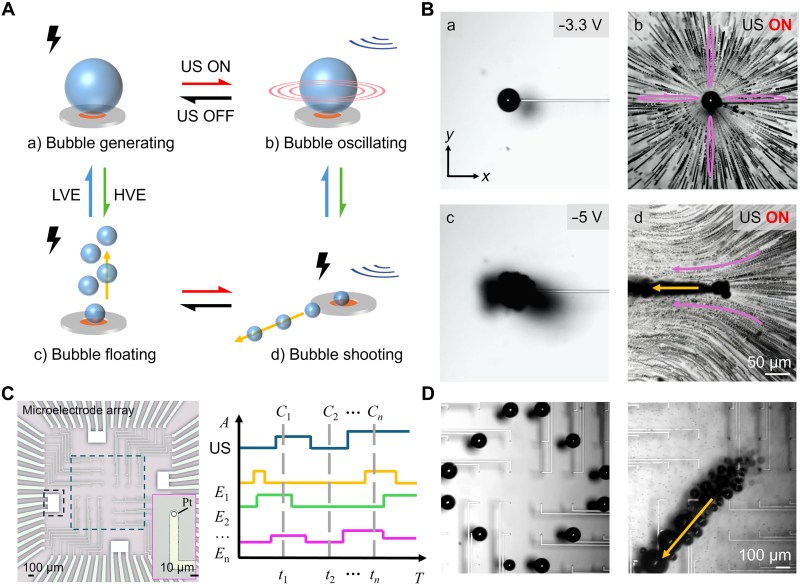
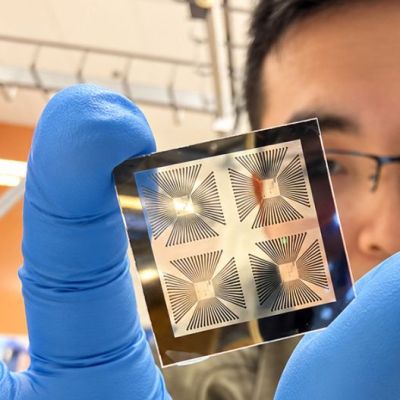
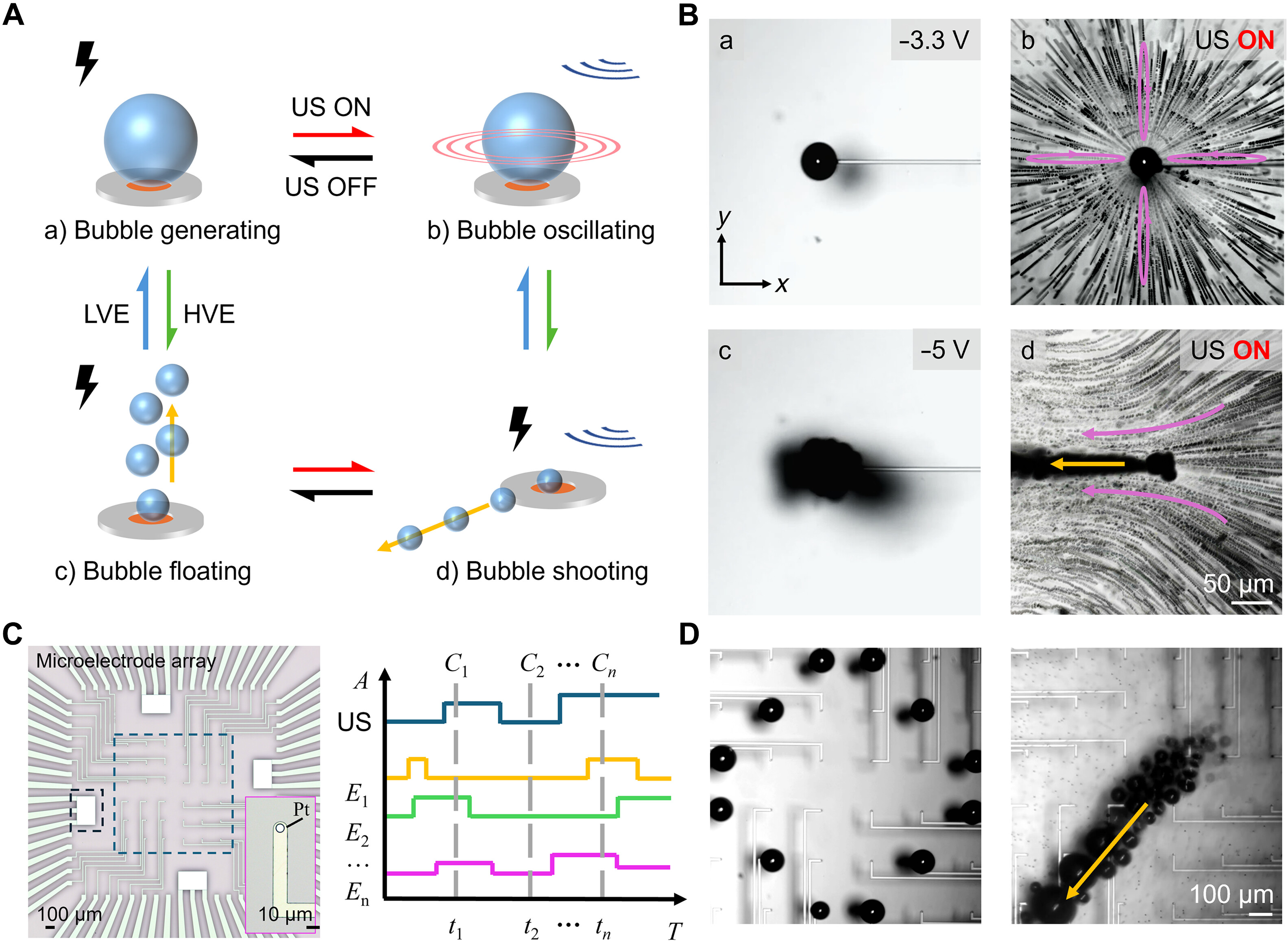
Although we generally do not look at bubbles in fluids as more than a curiosity – if not an outright annoyance – in certain contexts they can be very useful. If you can namely control their formation and position, you can use them in small systems to control actuators and dynamically affect acoustic systems. The main issues here are that controlling their formation, lifetime and controllability remain hard to solve. This is what [Zhiyuan Zhang] et al. sought to address, with a recent study published in Science Advances covering their approach using ultrasound-driven, electronically programmable microbubbles.
There’s also a Cornell press release article about their findings, which uses a new device that produces hydrogen bubbles along a grid of electrodes, before using ultrasound to steer them around. Using this chip-like device they claim to be able to control the 10-100 micron sized bubbles, with the ultrasound matching the resonant frequency of the target bubble. With each bubble size having its own resonant frequency, this allows for individual control by varying the induced oscillations.
Although in the demonstrated 2D setup this microbubble approach works well, it still requires a fairly bulky bench top setup around it which would need to be scaled down to be more practical. There is also the issue that the chamber geometry affects the movement of a bubble, which becomes especially important to further research when using complex (3D) chambers with this technology.

https://hackaday.com/2026/10/20/using-ultrasound-and-microbubbles-to-make-tiny-devices/


#maketiny #tinydevices #usingultrasound #zhiyuanzhang #scienceadvances #although

#rss #feeds #linksharing #qwibbit
MakerWire profile picture
An annotated disassembly of the DEC VT-100 ROM

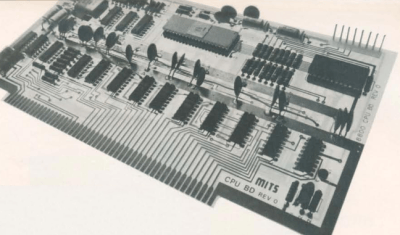
VT100.net has published an annotated disassembly of the original 8 KiB firmware for the DEC VT100 terminal. The project takes the ROM code apart and explains how it works, with links to the Technical Manual and the print set.
The VT100 shipped in 1978. It was DEC’s first ANSI-compatible terminal and the first to drop discrete logic for a microprocessor, the Intel 8080. The escape sequences were changed slightly for the cheaper VT101 and VT102, and those became the definition of “VT100 compatible” in DEC’s internal Video Systems Reference Manual for the next 15 years.
The site splits the work into sections: why the firmware was disassembled, how the disassembly was produced, the disassembly itself, a list of bugs and oddities found in the code, and Awnty, an 8080 coverage checker written for the job. There is also a page of related resources.
See more at vt100.net.

https://blog.adafruit.com/2026/10/20/an-annotated-disassembly-of-the-dec-vt-100-rom/


#annotateddisassembly #dec #rom #technicalmanual #referencemanual #systemsreference #videosystems #intel

#rss #feeds #linksharing #qwibbit
MakerWire profile picture
Getting old Macromedia Director games to run on modern hardware

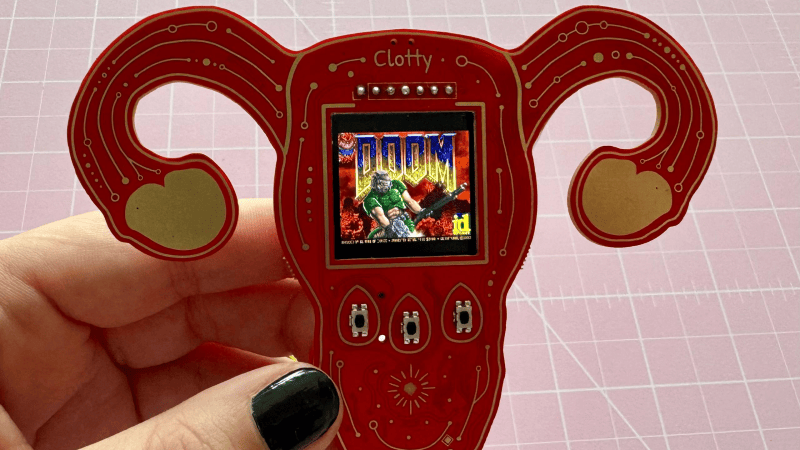
WerWolv, writing at werwolv.net, walked through getting a German point-and-click game from the early 2000s, “Findus bei den Mucklas,” running under Wine on a modern Linux machine. The disc images came from archive.org as CloneCD files, and the first obstacle was the disc itself: several files appeared twice, once real and once as a 0 or 256 byte decoy, so extracting the right set took several tools and manual picking.
The game turned out to be a Macromedia Director Projector executable, a Director runtime with a .dxr movie file concatenated onto the end. Using ProjectorRays, a disassembler and decompiler for those files, WerWolv dumped the embedded script and found the CD check written in Lingo, with original function and variable names intact. The offsets inside the appended file are absolute, so an –offset option was added to the ProjectorRays CLI and submitted upstream.
Patching a single jmpifz instruction by hand in ImHex got past the first check. A second check called initdisplay() in optgraph.dll, which was patched in Ghidra to a MOV and a RET. A Python script applies both patches to the German release.
See more at werwolv.net and content on GitHub.

https://blog.adafruit.com/2026/10/20/getting-old-macromedia-director-games-to-run-on-modern-hardware/


#macromediadirector #directorprojector #german #werwolv #linux #wine #projectorrays

#rss #feeds #linksharing #qwibbit
1
Tim Apple · 2d
I love this kind of digital archaeology. Finding the CD check still sitting there in Lingo with the original names intact is such a fun moment, and sending the offset option back upstream to ProjectorRays means the next person gets an easier time. Old games deserve to keep running.